THE RESEARCH / OUR INTERPRETATION
buildingSMART states that IDS specifies and checks alphanumeric IFC information; it does not cover geometry. That distinction matters when a product is described broadly as a BIM checker.
Three different questions need different checks
Does each relevant object have a material code? That is an information requirement. Is the clear width between these two measured faces at least the project’s agreed threshold? That is a geometric test. Does the reception feel welcoming and fit the client’s positioning? That is a design judgement. Combining them under “AI validation” hides who is responsible and what a pass actually means. Write each requirement with its input, method and expected evidence.
- 01Approved requirement
- 02Executable rule
- 03Model evidence
- 04Reviewer decision
Illustrative check chain. Always distinguish “not tested” from “passed”.
A door-width check starts with a measurement definition
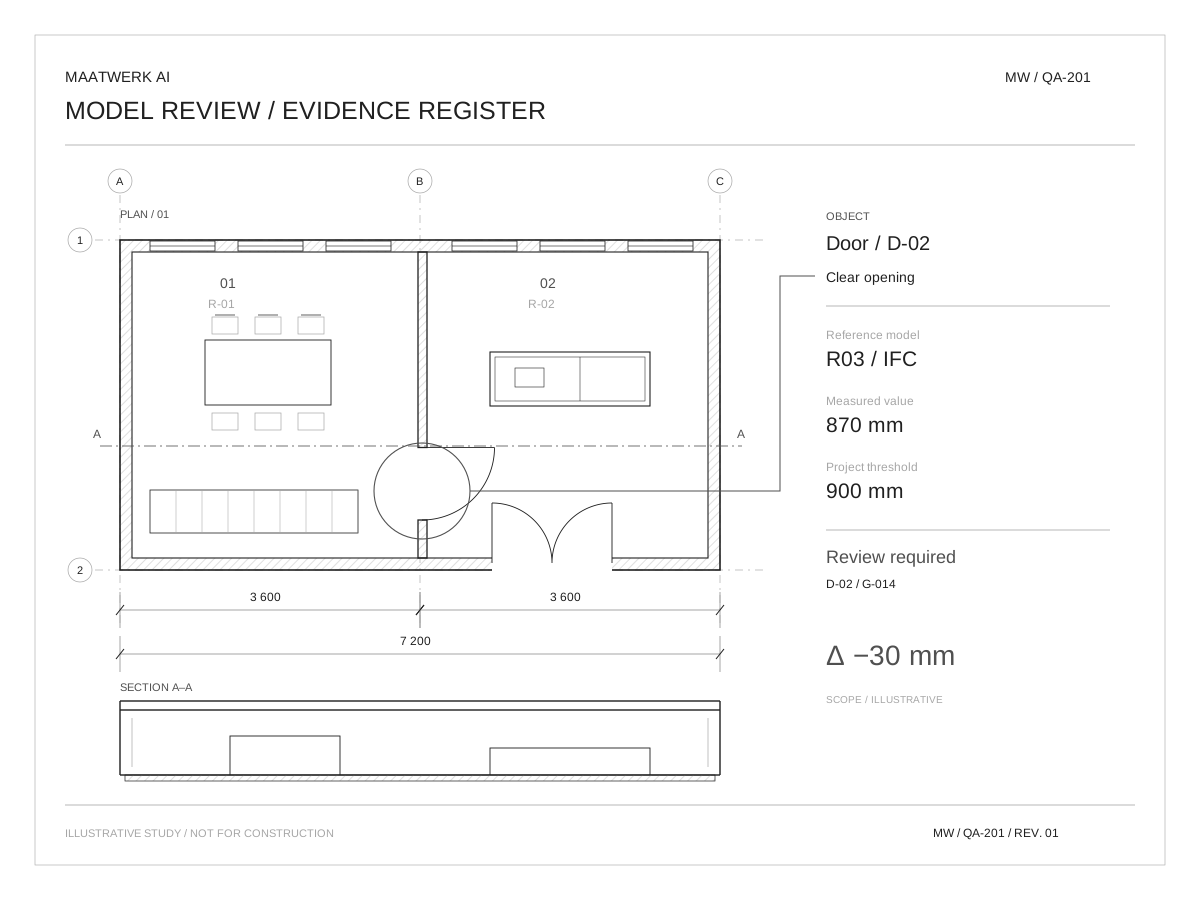
Consider an illustrative project requirement for door D-02: a clear opening of at least 900 mm. This is a supplied project threshold, not a statement about statutory requirements. A property called Width may describe the leaf, an opening or a family parameter; its label alone does not establish clear passage. The rule therefore needs an agreed measurement definition and an identified pair of bounding faces in a defined door state. If those faces cannot be obtained reliably from the available model, the result is not tested. In the drawing on this page, the example measured value is 870 mm, so the rule reports a 30 mm shortfall. The model identifier, object identifier, coordinate transform, unit conversion and rule revision belong with that result. Without them, a number is difficult to reproduce or challenge.
Start with one model and an explicit rule set
For an illustrative interior fit-out pilot, choose one model revision and a small set of rules: required object names, populated material references and a dimension check against supplied project requirements. In SketchUp, Revit, Fusion or an IFC exchange, first establish which properties and geometry the available interface actually exposes. A missing value is not zero. An unsupported object is not a pass. Both should appear as unresolved results.
Separate extraction, evaluation and explanation
A maintainable checker has three boundaries. The model adapter extracts geometry and properties without deciding compliance. The evaluator applies approved rules to a normalised record. The reporting layer presents the evidence and may use AI to explain it. This separation matters when the design tool changes: an adapter can be replaced without rewriting the rule’s meaning. In a Python-based pilot, a record might contain model_revision, object_id, rule_id, measured_mm, required_mm and extraction_status. The evaluator first rejects missing, non-finite or unsupported input as not tested, then compares valid values. It should not silently round a failing measurement upward. Any tolerance belongs in the agreed rule definition and report. An assistant can propose code, but review of the measurement method and tests remains a distinct engineering task.
| Input condition | Measured / required | Expected result |
|---|---|---|
| Valid extraction | 920 / 900 mm | PASS |
| Valid extraction | 870 / 900 mm | FAIL |
| Missing bounding face | — / 900 mm | NOT TESTED |
| Unit unresolved | 0.87 / 900 | NOT TESTED |
900 mm is the example project requirement, not a regulatory claim. Actual measurement depends on the agreed geometry definition.
Use code for measurement, AI for explanation
A Python routine can evaluate a defined predicate and return the object identifier, measured value, unit and rule version. An assistant can help turn a brief into proposed checks or explain an exception, but a reviewer must approve that translation into rules. Keep the check result separate from its narrative. If the assistant says “acceptable” while the measured result fails, the report must preserve the failure rather than soften it.
Test the failure modes a clean demonstration conceals
The test set should include a passing opening, a deliberately undersized opening, a missing object, an unsupported door type and a unit mismatch. Add a mirrored or transformed instance if the adapter claims to support one. A result that changes when the same geometry moves in world coordinates exposes a transformation error. A 0.87 value interpreted as millimetres rather than metres exposes a unit error. An empty model that returns zero failures without reporting zero coverage exposes a reporting error. These are different defects and need separate expected outcomes. The checker’s useful headline is therefore “18 of 22 applicable objects evaluated; 2 failed; 4 not tested”, not simply “2 issues”. Coverage, exclusions and unresolved extraction must remain visible even when the narrative summary is shortened.
Treat the report as a review instrument
Show passed, failed and not-tested items. Include a direct route to the relevant object or view, plus the model revision and execution time. Test the checker with a deliberately wrong model and with missing data; a system that only passes a clean example has not demonstrated useful detection. The pilot’s success is reliable, explainable issue detection with manageable review effort. It is not automatic approval of the design or proof of regulatory compliance.
Connect the result to a designer’s correction loop
The report is most useful when each finding opens a reproducible view or selects an identifiable object in the authoring environment. A screenshot alone becomes stale after a model change. The reviewer needs the relevant revision, the tested condition and a route back to the source geometry. Accepted exceptions should be recorded against a rule and revision, with a reason and an owner; they should not erase the original failure. A changed model then triggers the affected checks again. For a first integration, success might mean a reliable export-and-review loop rather than a live plug-in. Native integration, IFC exchange and file-based processing have different maintenance costs. The appropriate choice depends on the studio’s actual models and access, established during a technical pilot rather than assumed from the tool’s brand name.